Across our four products (Handl for agencies, Mortar for interior designers, Arbeo for hiring and TaliCMS for real estate associations), the onboarding decisions that mattered most were the same five. Make setup follow the kind of work the customer does. Use checklists that let people skip ahead. Start new things switched off. Import from the tools customers already use instead of asking them to type. And show prospects realistic demo data, never a real account. Here's what each of those looks like in practice, and the exceptions we made.
Why onboarding is different for niche products
Most SaaS onboarding advice is written for horizontal tools: a product tour, a welcome checklist, an empty state with a friendly illustration. All useful.
Niche products have an advantage those tools don't. We know who the customer is before they sign up. We know an agency runs fixed-price, time and materials and retainer projects. We know an interior designer either passes costs through or adds a markup. We know a home care agency hires caregivers. That means onboarding can ask fewer, better questions, and fill in more of the answers itself.
1. Setup follows the kind of work
Handl: the project type decides the steps
In Handl, a new project starts with a setup checklist. The steps change with the project type: fixed price, time and materials, retainer or hybrid. A retainer needs a billing period and included hours. A fixed-price build needs milestones. Neither should see the other's questions.
Setup is three steps: Details, Billing and Features. The project type also decides what comes next. The AI milestone suggestions know from the project's category whether it's a website build or a branding job, the suggested alerts fit the way the project is sold, and the project's tabs only appear for features that project uses. Internal projects, like an agency's own website, skip the client and billing steps entirely.
One rule made the biggest difference: every choice made during setup can be changed later, in the same field, in the same place. Wizards tend to ask big questions on day one, when you know least about the project. If picking wrong costs ten seconds to fix on day thirty, people answer quickly and get going.
Mortar: three skippable steps
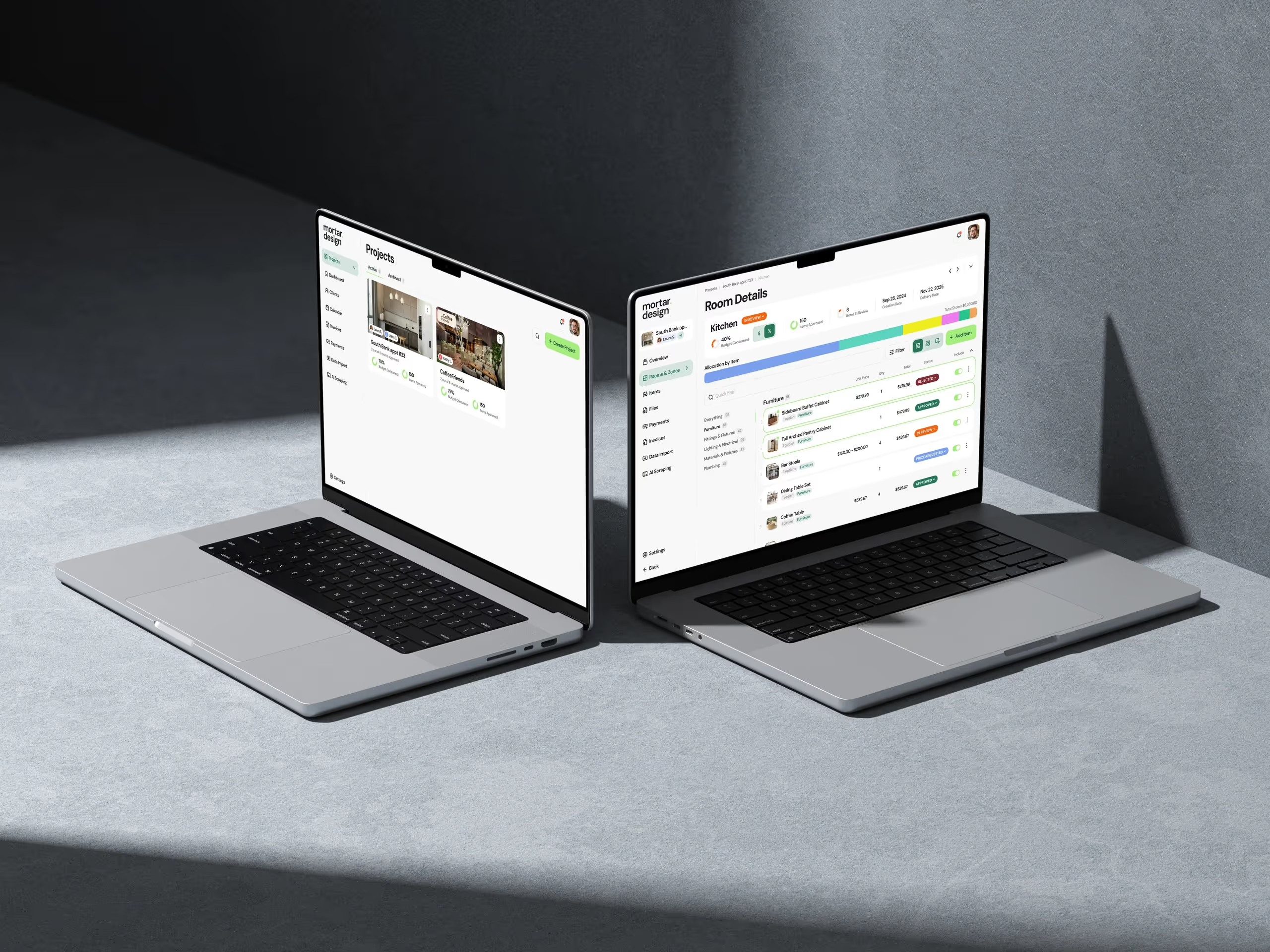
Mortar's onboarding is three steps: bring your brand, choose how you price (pass-through or a markup percentage), and set up your first project. Every step can be skipped. The pricing question is there because it shapes every budget a designer will build in Mortar, and it's a question only an interior design tool would think to ask.
Arbeo: the role decides the form
In Arbeo, new accounts start with a ready-made set of pipeline stages, so a hiring manager can move candidates on day one. Through First Shift, our entry point for US home care, agencies get role templates built for caregivers, so the first job they post already has the right application fields.
2. Checklists that let you skip ahead
Checklists work, as long as they don't become a gate.
Handl's project checklist marks what's required and what's optional, and anything that can wait gets a "set up later" option. The dashboard changes with where a new account is up to: a brand-new account gets a short welcome guide, and once there's real data it switches to real numbers. We later made the get-started checklist more compact and let people connect their integrations straight from onboarding.
Some setup isn't ours to finish. To take card payments in Handl, an agency has to complete their payment provider's own setup. So if anything's still outstanding, a banner on the dashboard says what in plain English, and Handl sends reminders 7, 3 and 1 day before the provider's deadline. A checklist item someone else controls still needs a nudge.
3. New things start switched off
This is the decision we've come back to most, and it's now a written rule in how we build.
- Features per project. In Handl's setup, timesheets, tasks, quotes and the rest are switched on per project, and they start off. A small maintenance retainer doesn't need the same screens as a six-month build.
- Anything the client can see. New client portal tabs start off, because every agency shares differently, and nobody should find out about a new view from their client.
- Anything that emails a client. Reminder sequences and self-sending retainer invoices are opt-in. The first time software sends something in your name that you didn't expect, you stop trusting it.
- Money settings. A new tax setting that changes how margin is calculated is off until the agency turns it on. People should choose the moment their numbers change.
- Hiring automations. Arbeo's status-change emails are opt-in per job, and they wait 24 hours so a mis-dragged candidate can be moved back before anything sends.
- Auto-import. Handl can bring in new projects from connected tools automatically, but only once that's switched on.
The exceptions, and why
Defaults off isn't a religion. Some things ship on, and we explain why each time.
New Handl projects come with a sensible set of alerts already in place: hours over allocation, a milestone deadline coming up, budget at 80%. They're on because they only ever tell the agency, never the client, and any of them can be switched off. Files that release when an invoice is paid are on by default for new projects, because nothing reaches the client until the agency sends the invoice. Pay-by-bank is on for Australian clients because it costs the client nothing and costs the agency less than card.
Our test is simple. If we can't explain the exception in a sentence, it isn't one.
4. Import from the tools customers already use
Every setup form is a small tax on a new customer. The worst ones ask for information that already lives somewhere else.
Handl reads your website. Sign up, drop in your agency's website, and Handl reads it to pre-fill your logo, brand colours, services and team, looking across several pages rather than just the homepage.
Handl finds your projects. Connect your project and timesheet tools, and Handl scans them for projects you haven't set up yet. If the same project shows up in two tools, it merges them. Import the ones you want and they arrive with both connections mapped, past hours backfilled and tasks pulled in, so the Tasks tab isn't empty on day one. It would have been quicker to build a CSV upload. But then the customer still does the export, the tidy-up and the upload.
Handl handles the move mid-project. Agencies rarely switch tools at a clean start. A billing start date per project keeps hours already invoiced in the old system off new invoices, while still counting them towards cost and margin.
Mortar brings your brand and your schedules. Mortar's first onboarding step pulls a studio's logo and colours from its website. Existing schedules come in from a CSV with column mapping, and inspiration comes in from Pinterest in the background while the designer keeps working.
Arbeo doesn't make candidates retype their CV. Onboarding applies to candidates too. Arbeo's chat application asks for a CV first, reads it, and only asks about what's missing. Candidates without a CV can still apply through the conversation.
TaliCMS keeps members' existing logins. On association sites we build with TaliCMS, members sign in with the login they already have. No second password to forget.
5. Demo data that looks like the customer's business
Prospects judge a product by its screenshots and videos long before they sign up. Those need to look like their business, and they must never come from a real customer's account.
So each product has its own demo account full of realistic sample data. Handl has a demo agency, built so we can record product videos without going near a real account. Mortar has a demo design project. First Shift has a demo home care agency with applicants across caregiver roles. The product screenshots in our studio log are captured from these, never from a customer's account.
It's a small investment that pays back every time a page, a directory listing or a video needs a fresh screenshot. And it means the first thing a prospect sees already looks like their world.
Onboarding for a CMS is a launch, not a sign-up
TaliCMS is different. Associations don't sign up for it on a Tuesday afternoon. Their onboarding is a launch, and it's measured by whether staff can run the site without calling us.
The decisions follow the same pattern:
- Nothing they had gets lost. Every old link is mapped to its new home, so members' bookmarks, old newsletter links and search rankings carry over.
- Staff run it themselves. Association staff manage pages, events and links in the CMS. An HTML embed block lets them add a third-party widget without waiting on us.
- Help is where they're working. The CMS admin has in-app help, so staff can search the guides or get in touch without leaving the page they're editing.
- Small blockers are self-serve. Staff can reset their own admin password instead of emailing us and waiting.
Texas REALTORS® launched two sites on TaliCMS on the same day in September 2026. As their team put it:
"Our new site on TaliCMS has handled the scale of a state association without missing a beat. Dazlab worked closely with our team through the build and launch, and the result is a site that's faster and much easier for our staff to keep current." — Angela Brutsche, CAE, RCE, Vice President of Communications & Marketing, Texas REALTORS®
More on how that project went at Texas REALTORS® and on the TaliCMS page.
What carries across
Four products' worth of onboarding boils down to one question we ask about every setup screen: where does this information already live? If the answer is "on their website" or "in their other tools", go and get it. If the answer is "nowhere yet", ask it once, make it easy to change, and keep everything the customer didn't ask for switched off until they do.
That's the same advice we'd give any founder scoping an MVP. Onboarding isn't a tour you add at the end. It's a set of product decisions, and in a niche product you can make most of them for the customer.
FAQ
What's the most important onboarding decision for a niche SaaS product?
Making setup follow the kind of work the customer does. Because you know your industry, you can ask fewer questions, pick sensible defaults and skip anything that doesn't apply to their type of project.
Should new SaaS features be on or off by default?
In our products, anything that affects a customer's clients, their money or their emails starts off. We make exceptions when a default only informs the customer, or when nothing reaches their client until they act, and we explain each exception.
How do you reduce data entry during onboarding?
Import from where the information already lives. Handl reads an agency's website and finds projects in its connected tools. Mortar pulls in a studio's brand and existing schedules. Arbeo reads a candidate's CV before asking anything.
Why use demo data instead of real customer accounts for screenshots?
It protects customers' privacy, and it lets you show realistic work for each industry whenever you need a new screenshot or video.
How is onboarding different for an association CMS?
It's a launch rather than a sign-up. Success means old links still work, staff can run the site themselves, and help is available inside the admin.
If you're designing onboarding for a niche product and want a studio that has done it four times, here's how we work.
 Consulting Inquiries